A modal in our back office started rendering behind the page. Not invisible — it was there, painted, obviously alive. It was just confined to a strip about sixty pixels tall at the top of the window, with the rest of the page drawn straight over it.
Its CSS said position: fixed; inset: 0; z-index: 99999. The content it was losing to had z-index: 1.
The symptom points at the wrong thing
Because the overlay looked washed out where it did show, I spent the first stretch of this convinced it was a transparency problem. I went through opacity, then backdrop-filter, then background alpha, then whether some parent had a blend mode. All of it was wasted — there was nothing wrong with any of them. What I was seeing wasn't a translucent modal. It was page content drawn on top of an opaque one.
The actual cause was one declaration on an ancestor, five levels up:
<div class="toolbar">
  Filters
  <div class="overlay">MODAL — z-index: 99999</div>
</div>
<div class="page">page content, z-index: 1</div>

.toolbar { position: sticky; top: 0; }        /* ← the entire bug */
.overlay { position: fixed; inset: 0; z-index: 99999; }
.page { position: relative; z-index: 1; }Here is that markup rendered in a real browser, next to the identical markup with position: sticky deleted:
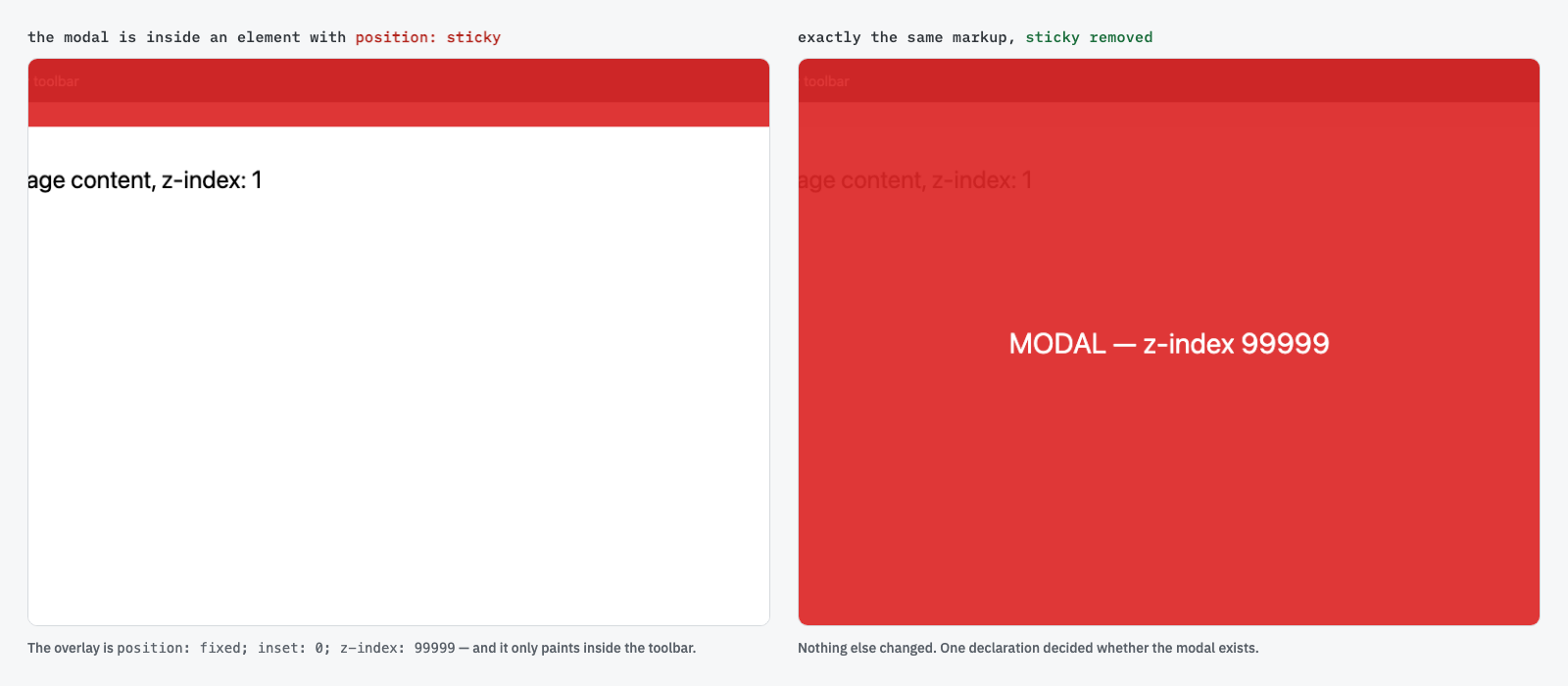
Why sticky does this
A position: sticky element always creates a stacking context. Not conditionally, not only when you give it a z-index — always. That is different from position: relative, which only creates one once z-index is something other than auto, and it is why this catches people.
Once an ancestor owns a stacking context, every z-index inside it is resolved within that context. Your 99999 doesn't compete with the rest of the page any more — it only competes with the toolbar's other children. The whole toolbar then takes its own place in the page's stacking order, and your modal is a passenger inside it. There is no number large enough to escape, because the number is being read in the wrong room.
A useful way to hold it: z-index is not a global ranking. It is a rank among siblings inside whichever stacking context you happen to be in — and lots of ordinary CSS silently creates one.
Diagnosing it in one paste
You don't have to guess which ancestor is responsible. Walk up the tree and print every element that creates a stacking context:
// Paste this in the console while the broken modal is on screen.
// Walk up from the overlay and print anything that creates a stacking context.
let el = document.querySelector('.overlay')
while ((el = el.parentElement)) {
  const s = getComputedStyle(el)
  if (['sticky','fixed'].includes(s.position) ||
      s.transform !== 'none' || s.filter !== 'none' ||
      s.willChange !== 'auto' || s.opacity !== '1' ||
      s.contain !== 'none' || s.isolation === 'isolate') {
    console.log(el, s.position, s.transform, s.filter, s.opacity)
  }
}It is worth knowing the rest of that list, because sticky is only the one that caught me. transform, filter, opacity below 1, will-change, contain, isolation: isolate, and backdrop-filter all create a stacking context too. A CSS animation library that adds transform: translateZ(0) for GPU compositing will do this to you and never mention it.
The fix, and the rule that follows from it
Raising the z-index cannot work. The modal has to be rendered somewhere that isn't inside the trapping context at all — which in React means a portal:
import { createPortal } from 'react-dom'

export function Overlay({ children }) {
  // Render into <body>, outside every stacking context on the page.
  return createPortal(<div className="overlay">{children}</div>, document.body)
}The rule I now apply without thinking about it: anything that must cover the viewport gets portaled to document.body — modals, dropdowns, toasts, tooltips, command palettes. Not because I know there's a stacking context in the way, but because I can't guarantee there isn't one, and the failure is silent, visual, and points at the wrong suspect.
- It compiles. There is no error, no warning, no console message.
- It renders — which is worse than not rendering, because it looks like a styling problem rather than a structural one.
- It is invisible in code review: the modal's own CSS is perfectly correct, and the line that breaks it is in a different file.